The point of sale built for Mississippi dispensaries.
Green Light POS runs your register, your cash, your inventory and your state reporting in one place. Metrc, the daily PMP report and MMCEU purchase limits are part of every sale, not an add-on.
- Register on Android tablets
- Back office in your browser
- Menu and order screens on your store TVs
- Your own business account and database
- MMCEU limits checked on every saleOver the limit? The sale is refused.
- Daily Mississippi PMP reportBuilt and sent when you close the safe.
- Metrc reportingSales sent automatically, checked daily.
- Every action auditedWho, when, which device, which IP.
The rules are checked on every sale
Green Light checks the patient, the product and your staff before a sale goes through, then reports it to the state for you.
- Daily PMP report, handled. Green Light builds the Mississippi Prescription Monitoring Program report (ASAP 4.2B) and sends it when you close the safe. Missed days are caught up, and you get an email if a send fails.
- Metrc, in step. Sales are reported automatically. Anything that didn't go through is listed so you can resend it, and a daily reconciliation compares your sales with what Metrc recorded.

MMCEU purchase limits
At every sale the register asks Metrc how much the patient has left, so purchases at other dispensaries count too. A sale that would go over the limit is refused, and so is one Metrc can't confirm. Visitor-card limits are enforced too.
Medical card checks
A cannabis sale needs a medical card number, an unexpired card and the physician's license on file. Expired cards and underage patients are flagged at check-in.
Agent card for every cashier
The person ringing the sale must have a Metrc agent card on file that hasn't expired. Sales are always recorded under the employee who is signed in.
Store-hours sale lock
Set your opening hours and the register won't sell outside them. After you close the safe for the night, no more sales go through. Refused sales are recorded.
Sales-floor room gate
Only packages on the Sales Floor can be sold. Packages in the Problem Room, on hold in Metrc, or without a passing lab test are blocked at the register.
Scan-only tracking
Every item rung up on the tablet is saved with how it was entered: barcode scanner, camera, typed, or tapped. That backs up a scan-only policy with a record.
Fast at the counter, careful with every package
Your budtenders scan, sell and print. Green Light makes sure what leaves the store is allowed to leave it.
- Cash and debit. Change is worked out for you, with optional tips and a printed receipt.
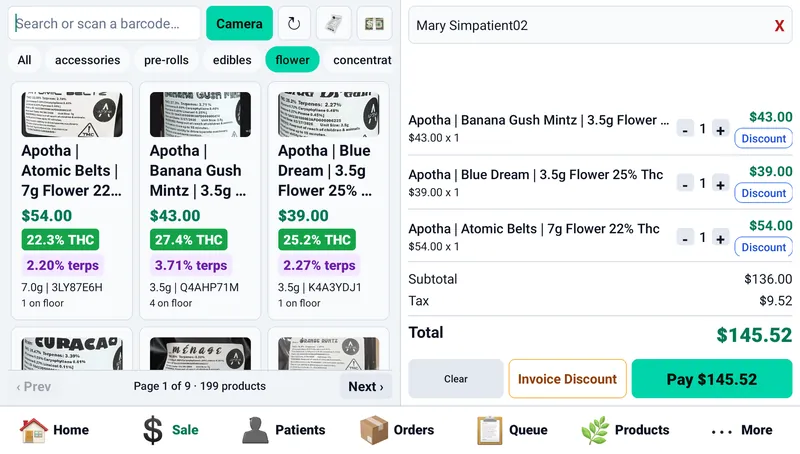
- THC and terpenes at a glance. Each product card shows THC and terpene percentages, the package tag and how many are on the floor.
- Manager-PIN approvals. Price changes and discounts can require a manager's PIN, and the approving manager is saved with the sale.
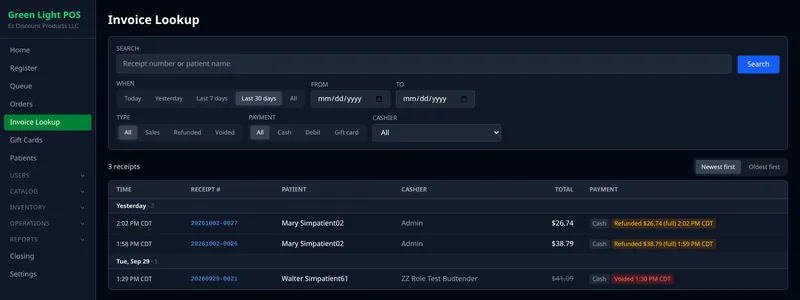
- Receipts and refunds. Find any receipt by day, type, payment or cashier, and refund all of a sale or just part of a quantity.

ID scan check-in
Scan a driver's license with a 2D barcode scanner to find the patient, including caregivers who shop for a patient, and check them in to the line.
Receipts and labels
Print receipts on Star receipt printers, open the cash drawer from the printer, and print barcode box labels on a Zebra label printer when you receive a delivery.
Self-order kiosk
Busy line? A self-order kiosk mode lets patients build an order on a lobby tablet. New orders show up on the fill screen for staff to pack.
Your menu and your orders, on the TVs in your store
Plug an Amazon Fire TV stick into a TV and it becomes a price board for the lobby, a fill screen for staff, or a pickup screen for customers. It all runs from the Fire TV remote.
TV menu boards
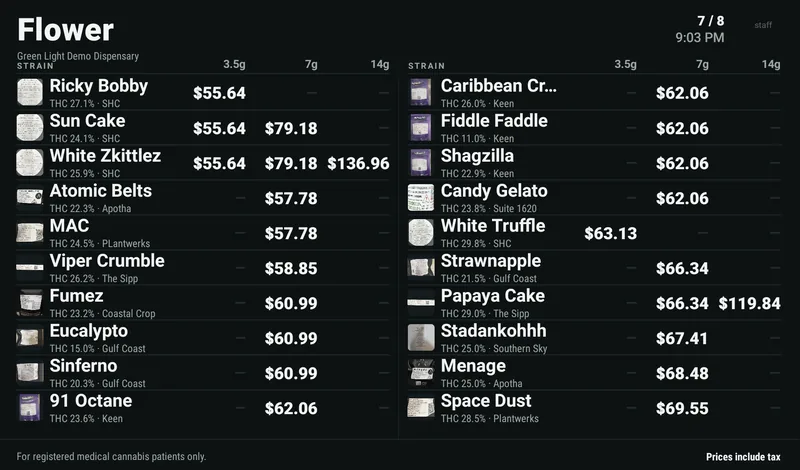
A price board with one row per strain and a price column for each size. Products are grouped by brand with a small photo. Sale prices show the original price struck through, and every price includes tax, so the number on the TV is the number at the register.
Set up from the back office
Choose each TV's categories, sizes, price range and sort order, with a live preview as you go. Changes reach the TV in seconds.
Easy to read, steady to run
Text is sized to read from across the room. If the internet drops, the TV keeps showing the last menu it had.
Portrait or landscape
Hang the TV whichever way fits your wall. Press ☰ on the remote to rotate the picture.
One manager PIN
A manager's PIN switches what a TV shows: the fill screen, the pickup screen or a menu board.
Fill screen for staff
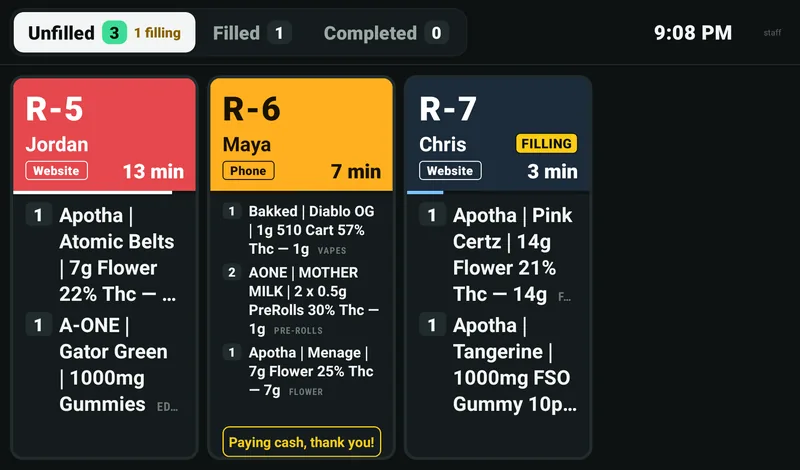
Orders waiting to be packed, on a TV in the back, with three tabs: Unfilled, Filled and Completed. Mark an order "Filling" so two people don't pull the same one, hear a chime when a new order comes in, and press Mark filled when it's bagged, with Undo for a wrong press.
Pickup screen for customers
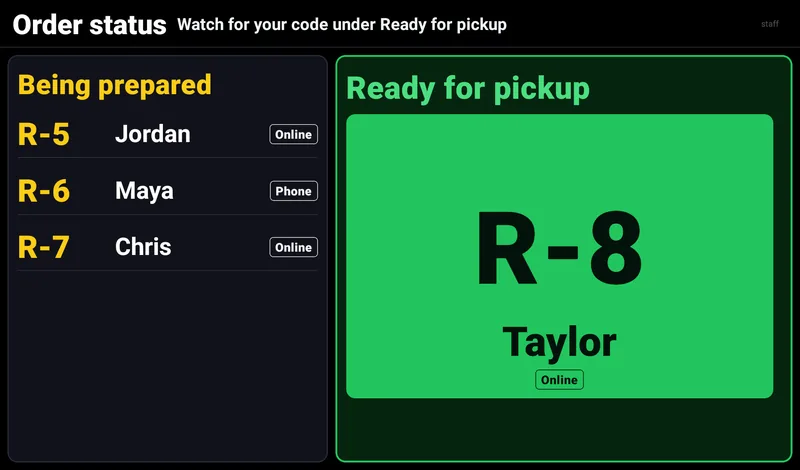
Order codes move from Being prepared to Ready for pickup, so patients in the lobby know when to come to the counter. It shows codes and first names only, never what anyone ordered.
Updates itself
New versions download on their own, and a manager installs them with one press. With more than one store, each store's TVs show only that store's stock.
See the real screens
Every picture here is the actual app, running our demo business with made-up patients.
The register
Search or scan a barcode, filter by category, and see THC, terpenes and floor stock on every card. The cart shows each line, discounts, tax and the total.
Payment
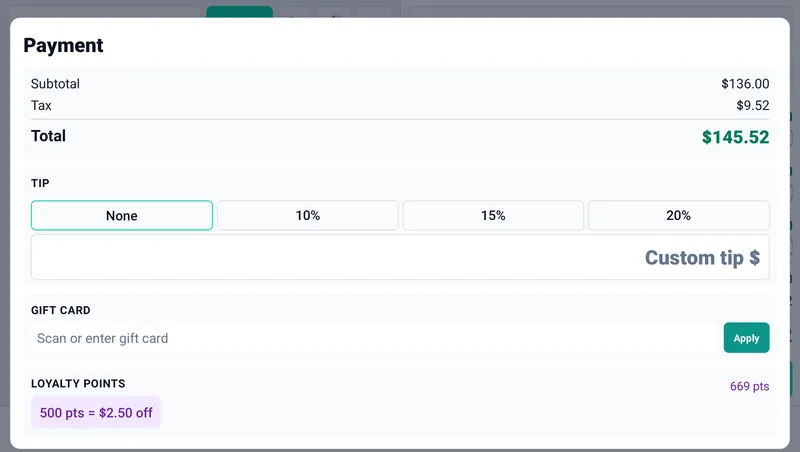
Optional tips, gift cards, and the loyalty rewards the patient can afford, all on one screen before you take cash or debit.
Loyalty
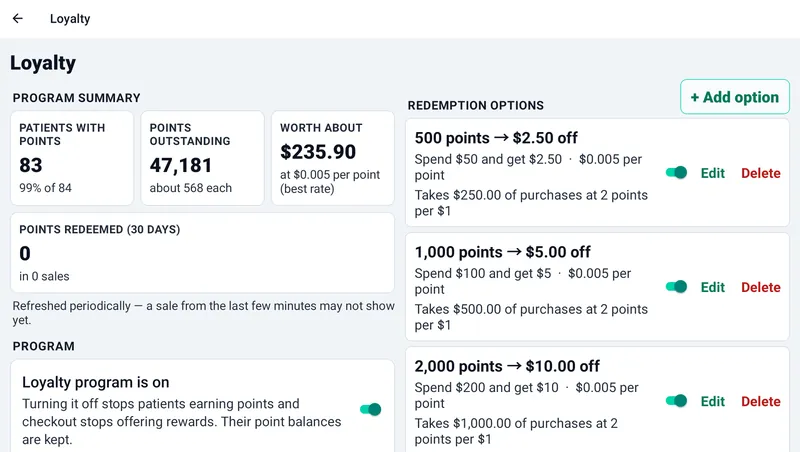
Set up several rewards. Each one shows what it's worth per point and how much a patient has to spend to earn it, so there are no surprises.
Cash management
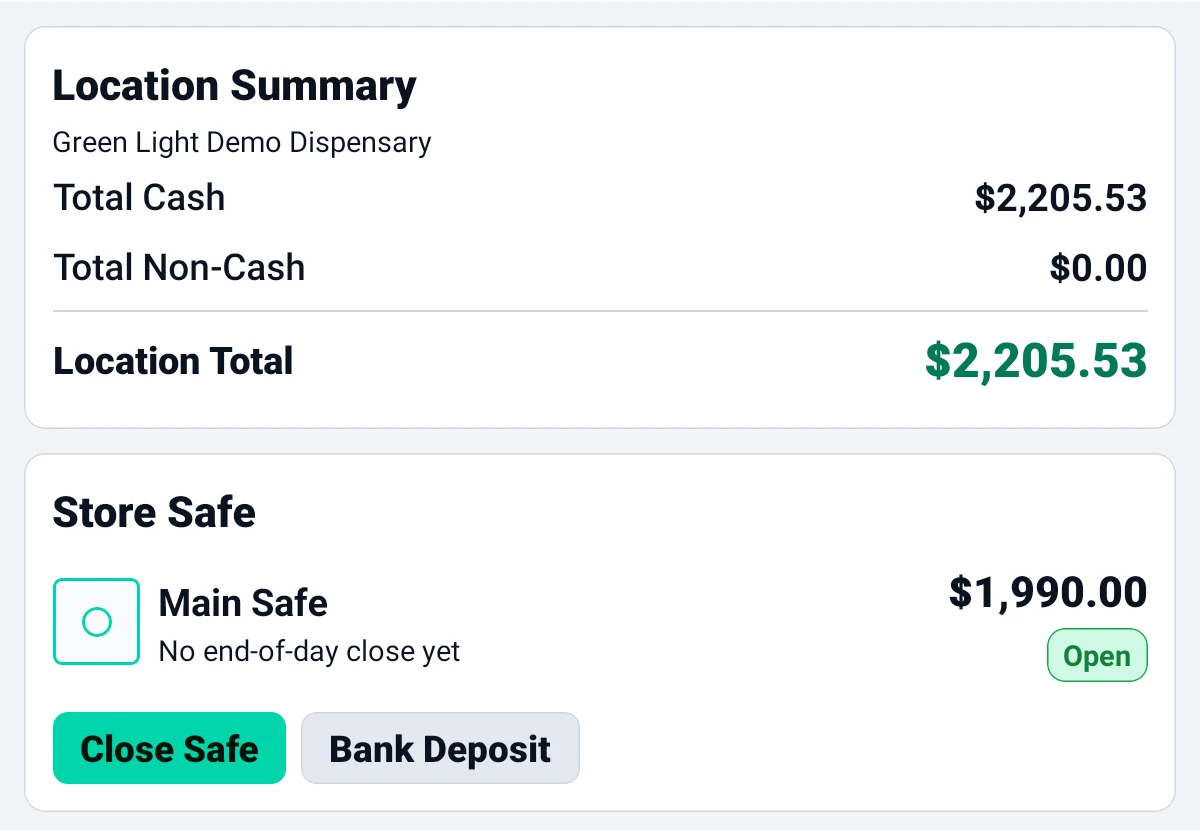
The safe, every drawer and every bank deposit in one place, with a name and a time on each movement.
Invoice lookup
Find any receipt by number or patient, filter by date, type, payment and cashier, and see refunds and voids at a glance.
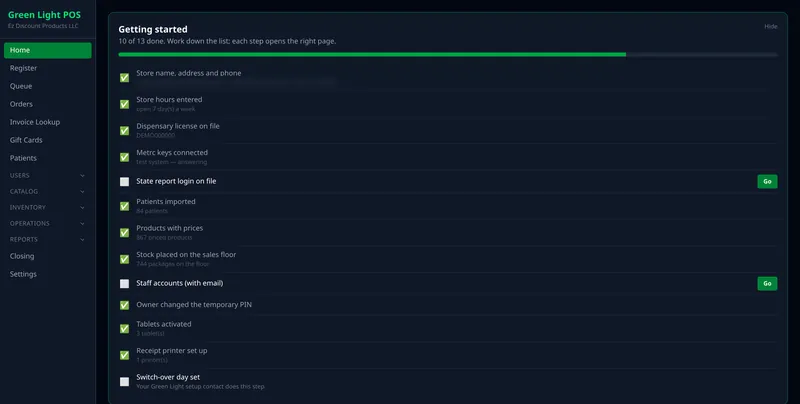
Getting started
New stores get a setup checklist. Each step opens the right page, and it checks itself off when it's done.
Know where every dollar is
From opening the safe in the morning to closing it at night, every cash movement has a name and a time on it.
Safe and drawers
Open the safe, cash in each register, and close out at the end of the shift. Registers can't cash in while the safe is closed, and the safe can't close while a register is still cashed in.
Blind counts
Count the drawer by bill and coin. Staff without permission to see cash totals count without being shown what the drawer should hold.
Cash drops and drawer audits
Move extra cash from the drawer to the safe mid-shift, witnessed by a manager's PIN if you choose. Managers can count a drawer at any time to check it.
Z-report and closing
Each close-out prints a Z-report with cash, debit and tips, and shows any over or short. Payouts from the register are a store setting you can leave off.
Your shelves and Metrc, in step
Packages come in from Metrc, move through your rooms, and are tracked down to the tag.
Receive Metrc manifests
See incoming transfers, receive a manifest into your inventory, and match each package to a product. Repeat items are matched for you, and a manifest can't be received twice.
Package sync and lab results
Packages sync from Metrc, along with lab test results and certificates of analysis, so THC and test status are on hand at the counter.
Rooms
Keep stock in a Back Room, a Sales Floor and a Problem Room. Moving packages between rooms takes the right permission, and every move is recorded.
Adjustments reported to Metrc
Managers can correct a package's quantity using Metrc's own adjustment reasons, and the change is sent to Metrc.
Inventory counts
Run counts with blind mode, so counters don't see expected numbers, and manager approval before adjustments are applied.
Purchase orders
Order accessories and other non-cannabis products from your suppliers with purchase orders, and receive them into stock.
More than one store
Each store keeps its own stock, registers, TVs, hours and Metrc license, and a sale only ever comes out of that store's shelves. Need the big picture? View every store's inventory at once, each item marked by store.
Bring patients back, keep their details safe
- Patient profiles. Medical card, physician, caregiver and purchase history in one profile. Date of birth, ID and card numbers, phone and email are saved encrypted.
- Private patient files. Documents you attach are kept private, only shown to staff with permission, and every upload and view is recorded.
- Loyalty points. Patients earn points on what they spend. Set up several rewards, such as 500 points for $2.50 off or 1,000 points for $5 off, and the register offers the ones a patient can afford.
- Fair refunds. When a sale is refunded, the points earned on it are taken back and points spent on it are returned.

Who did what, on the record
When a state inspector or your own manager asks what happened, the answer is already written down.
- Every action logged. Sales, refunds, voids, cash drops, sign-ins and sign-outs are logged with who, when, which device and which IP address.
- Every refusal and override, too. A refused sale, a refused permission, or a manager override is recorded, not just the sales that went through.
- A reference number on every error. Read it to support and we can find exactly what happened.

Tamper-evident seals
Every hour, Green Light seals the audit records so that a changed or deleted record shows up, and sends an alert if a seal ever breaks.
Can't be erased
Green Light runs on a limited database account that can add audit records but can't change or delete them. Even the system can't erase the audit trail.
Change history
Changes to products, prices, patients, rooms, settings and more are kept with the before and after values. Search it, or export it to a spreadsheet.
Security roles
Budtender, Assistant Manager, Manager and Owner roles come ready to use, with permissions you can switch on or off one by one. Only the Owner can change them.
Your tablets only
Each register tablet must be activated for your business before it can be used, and you can revoke one remotely at any time.
Sign in where you work
Staff use email and password in the back office and a PIN on the tablets, and can stay signed in on more than one device. Signing out ends the session.
Bring your patients and inventory with you
Export your reports from your current POS and upload them to Green Light. Each import checks the file first and shows what will be added before anything changes.
Pick your current POS when you start: Cova has a built-in import, and for any other system our team moves your data over with you.
Import patients
Upload your patient export. Green Light reports what it found by counts and row numbers.
Import inventory
Upload your inventory report. Products, prices and Metrc packages are brought in, and accessories come over too.
Match your rooms
Every room from your old system is listed with a best-guess match to your Green Light rooms, and you can change any of them.

New businesses also get a setup checklist and a "Getting started" card for the Owner, covering store hours, your license, Metrc keys, the PMP login, staff, tablets and printers.
Help is one tap away
Health checks
The Help page checks your store, Metrc, PMP reporting, backups, tablets, printers and email, and tells you in plain words how to fix anything that needs attention.
Get Help
Send a request from the tablet or the back office in one tap. It includes the app version and the health check results, never patient information.
Updates
The tablet app tells you when a new version is ready to install.
Careful by design
Green Light's server is written in Rust, a programming language known for speed and reliability, and an automated test suite checks rules like purchase limits and permissions. When something can't be confirmed, such as a patient's purchase total, the sale is stopped rather than allowed.
Simple monthly pricing
One flat monthly price per business.
Starter
For a single dispensary.
- 1 location, 3 registers
- Android tablet register and browser back office
- Metrc sales reporting and package sync
- Daily Mississippi PMP report
- MMCEU purchase limits and medical card checks
- Safe, drawers, cash drops and Z-reports
- Inventory, rooms and counts
- Patient profiles and loyalty points
- Security roles, audit log and change history
- Help page and email support
Professional
For growing businesses with more than one store.
- Everything in Starter, plus:
- Up to 5 locations
- Unlimited registers
- Self-order kiosk
- TV menu boards
- Fill and pickup screens for store TVs
- Purchase orders for accessories
- Zebra barcode label printing
Enterprise
For larger operators. Let's talk.
- Everything in Professional, plus:
- Unlimited locations
- TV menu boards
- Hands-on help switching from your current POS
- Pricing built around your stores
See Green Light POS in action
Email us and we'll set up a private demo with your own sign-in.
Or email hello@greenlightpos.com. Already a customer? Log in to Green Light POS.